9 min read Stefan
5 Free ATS-Friendly Word Resume Templates (2026)
Getting past the first screen in 2026 comes down to one thing: whether an Applicant Tracking System can read your resume at all. The five templates below are single-column, standard-heading Word layouts you can copy straight into a blank .docx. No download, no sign-up, no fighting someone else’s formatting.
Direct Answer: A free ATS-friendly Word resume template is a single-column .docx with standard section headings (Work Experience, Education, Skills), a common font like Arial or Calibri, and no text boxes, graphics, or multi-column sidebars. ResuFit checks any resume against those rules, then rewrites it for the specific job.
What you’ll take away:
An Applicant Tracking System is software employers use to filter and manage applications. Many employers, especially larger companies, screen applications through an ATS before a person reads them. The reason a resume gets cut is often not the candidate’s qualifications. It is the formatting and structure the parser choked on.
Modern ATS platforms such as Greenhouse, Lever, and Workday increasingly weigh more than exact keywords, matching how your experience fits the job description. Keyword stuffing does not hold up. The content has to be real, and the format has to be machine-readable first. The resume itself is evolving alongside these systems, and the resume trends worth tracking this year go well beyond ATS formatting.
How does your resume score?
Check Your Score FreeThe difference between a resume that parses and one that gets scrambled is almost always the layout. A clean single column reads top to bottom in the order you intended. A sidebar or a color-blocked header forces the parser to guess, and it often guesses wrong.
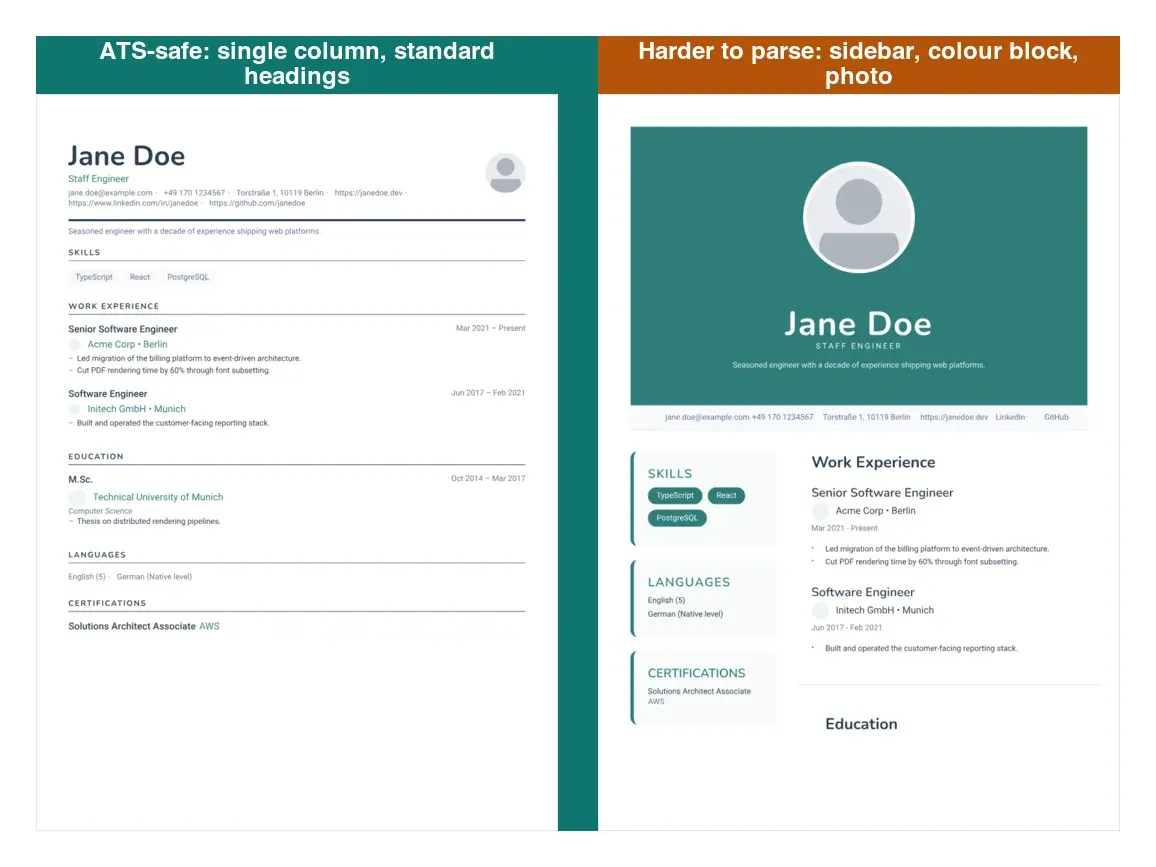
Look for these characteristics in any template:
Avoid the elements that trip parsers up: headers and footers with critical information, graphics and icons, text boxes, complex tables, and multi-column sidebars. Harvard’s resume guide and Indeed’s ATS resume advice both land on the same conclusion: strategic simplicity wins.
A template is a starting point, not a finished application. Here is the honest trade-off between filling one in by hand and letting ResuFit tailor the content for you.
| Static Word template | ResuFit | |
|---|---|---|
| What you get | A blank layout to fill in | A resume rewritten for the specific job |
| ATS formatting | Safe if you don’t break it | Kept ATS-safe automatically |
| Keyword matching | You match them by hand | Matched to the job description |
| Time per application | Re-edit every time | Tailored in minutes |
| Cost | Free | Free to start |
| Best for | A clean base you customize yourself | Applying to many roles fast |
A Word template gives you a layout. ResuFit gives you a resume rewritten for the job. If you want the layout and the rewrite in one step, ResuFit’s free AI resume builder starts from your details and keeps the formatting ATS-safe.
Each template below is single-column, uses standard headings, and drops anything an ATS can’t read. Copy the one that fits, paste it into a blank Word document, replace the placeholders in brackets, and save as .docx. No download required.
[First Name Last Name]
[City, State]  ·  [Phone]  ·  [Email]  ·  [LinkedIn URL]

PROFESSIONAL SUMMARY
[Two sentences: what you do, for whom, with one measurable result.]

WORK EXPERIENCE
[Job Title]  |  [Company, City]  |  [Month Year – Month Year]
- [Achievement with a number: increased revenue by X%, cut costs by $Y]
- [Achievement with a number]
- [Achievement with a number]

[Job Title]  |  [Company, City]  |  [Month Year – Month Year]
- [Achievement with a number]
- [Achievement with a number]

EDUCATION
[Degree]  |  [University, City]  |  [Year]

SKILLS
[Skill 1, Skill 2, Skill 3, Skill 4, Skill 5, Skill 6][First Name Last Name] | [Target Role]
[Email] · [Phone] · [LinkedIn] · [GitHub / Portfolio]
SUMMARY
[Two sentences: what you build, for whom, with what measurable outcome.]
TECHNICAL SKILLS
Languages: [languages]
Frameworks: [frameworks]
Cloud / DevOps: [platforms, tools]
Databases: [databases]
WORK EXPERIENCE
[Job Title] | [Company, City] | [Month Year – Present]
- [Stack or method used]
- [Measurable output, e.g. "cut deployment time by 60%"]
- [Measurable output]
[Job Title] | [Company, City] | [Month Year – Month Year]
- [Stack or method used]
- [Measurable output]
EDUCATION
[Degree] | [University] | [Year]
CERTIFICATIONS
[Certification] | [Issuer] | [Year][First Name Last Name]
[City, State] · [Phone] · [Email] · [LinkedIn]
SUMMARY
[Degree / field], seeking [entry-level role / internship] in [area].
EDUCATION
[Degree] | [University, City] | [Expected/Grad Year]
- GPA: [X.X] (include if 3.5+)
- Relevant coursework: [Course 1], [Course 2], [Course 3]
EXPERIENCE
[Role / Internship] | [Organization, City] | [Month Year – Month Year]
- [Task and a concrete contribution or result]
- [Task and a concrete contribution or result]
PROJECTS
[Project name] – [what you built, tools used, outcome]
SKILLS
Technical: [tools]
Languages: [language – level][First Name Last Name] | [Current Senior Title]
[Email] · [Phone] · [LinkedIn] · [City]
EXECUTIVE SUMMARY
[Three sentences: industry, scope of responsibility, and a track record
with a quantified business result such as P&L size or growth rate.]
CORE COMPETENCIES
[Strategy] · [Transformation] · [P&L Ownership]
[Team Leadership] · [M&A] · [Stakeholder Management]
WORK EXPERIENCE
[Title] | [Company, City] | [Month Year – Present]
[One line on business scope: revenue, headcount, region.]
- [Strategic result with a number]
- [Strategic result with a number]
- [Strategic result with a number]
[Title] | [Company, City] | [Month Year – Month Year]
- [Strategic result with a number]
- [Strategic result with a number]
EDUCATION
[MBA / Degree] | [Institution] | [Year]
BOARD & SPEAKING (optional)
- [Title] – [Event / Publication], [Year][First Name Last Name]
[Specialization]
[Email] · [Phone] · [LinkedIn] · [Portfolio URL]
SUMMARY
[Two sentences: specialization plus proof, ideally one campaign or
project with reach or measurable impact.]
WORK EXPERIENCE
[Title] | [Company, City] | [Month Year – Present]
- [Campaign or project with a measurable result]
- [Campaign or project with a measurable result]
- [Campaign or project with a measurable result]
[Title] | [Company, City] | [Month Year – Month Year]
- [Project with a measurable result]
- [Project with a measurable result]
SKILLS
Strategy: [methods]
Tools: [Adobe Suite, Figma, Canva, ...]
Platforms: [Meta Ads, Google Ads, ...]
SELECTED WORK (linked in portfolio)
- [Project name] – [result]
- [Project name] – [result]
EDUCATION
[Degree] | [University] | [Year]FirstName_LastName_Resume.docx.The template handles format. The content still has to earn the ranking:
| Myth | Reality |
|---|---|
| “ATS-friendly means boring” | A single-column resume can still look modern. Strategic simplicity, not blandness, is the goal. |
| “All PDFs work with ATS” | Image-based or heavily designed PDFs still fail. A clean .docx is the safer default. |
| “More keywords are always better” | AI-powered ATS flag stuffing. Natural, relevant terms win. |
| “You need to pay for a good template” | Every template in this article is free, and price does not affect parsing. |
| “AI-powered ATS means AI should write your resume” | The ATS scores the quality of your content, not who wrote it. A specific, human-edited resume beats generic AI filler. |
A resume that satisfies the ATS and still reads well to a recruiter is the target. The templates above get you the format for free. For a full look at no-cost options, see our guide to truly free resume builders. When you want the content tailored automatically, ResuFit checks ATS compatibility and rewrites your resume for the specific job before you submit.
How does your resume score?
Check Your Score FreeGet the latest tips on resume writing and career advice.
An ATS-friendly resume uses clean single-column formatting, standard section headings, compatible fonts like Arial or Calibri, and avoids elements that automated parsers cannot read: text boxes, graphics, headers and footers with contact details, and complex tables.
Yes. What decides ATS performance is formatting, not price. A single-column .docx with standard headings parses the same whether the template was free or paid. Paid templates mostly buy visual polish, which the ATS never sees.
Save as .docx for maximum ATS compatibility unless the employer specifically requests PDF. Most modern AI-powered ATS handle both, but Word documents are parsed more reliably by older systems. When in doubt, have both versions ready.
Test it with ResuFit's ATS simulation. Check for standard section headings, avoid text boxes and headers/footers for critical information, use simple single-column formatting, and make sure every piece of text is real text rather than embedded in an image.
Avoid text boxes, complex table structures, headers and footers containing vital information, graphics and icons with embedded text, unusual section headings like 'My Journey' instead of 'Work Experience', and multi-column sidebars that scramble reading order.