6 min read Stefan
5 Best Apple Pages Resume Templates for Mac Users (2026)

Pages ships free on every Mac with a set of polished resume templates, so the real question is which ones survive an applicant tracking system. The answer is the single-column layouts. The two-column, sidebar ones look great and often get scrambled by the parser. This guide covers the five layout styles you will find, which are ATS-safe, and how to export so your resume stays readable.
Direct Answer: The best Apple Pages resume templates are the free, built-in single-column layouts, because they stay readable to both recruiters and an ATS. Export as PDF or .docx via File then Export To. ResuFit then checks the result and rewrites your resume for the specific job.
What you’ll take away:
Pages comes free on every Mac, iPhone, and iPad, syncs through iCloud, and its templates look sharp out of the box. The catch is that visual polish and ATS-readability are different problems. A template can be gorgeous on screen and still confuse the software that screens your application first.
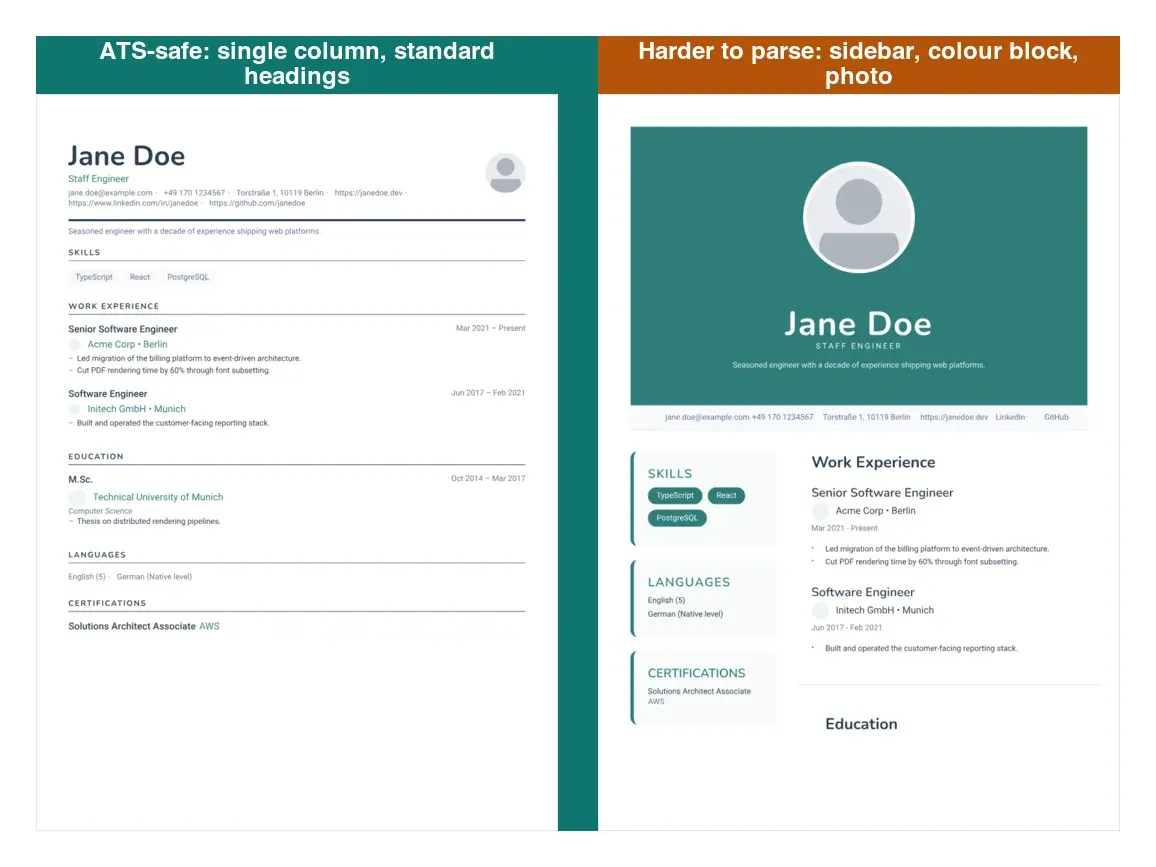
The rule is the same one that governs ATS-friendly Word templates: a single reading column with standard headings tends to parse more reliably, while a sidebar or color-blocked header makes the parser guess. How strictly this bites varies by ATS, so when in doubt, keep it simple.
How does your resume score?
Check Your Score FreeOpen Pages, choose File then New, and look in the Resume category. The built-in templates fall into a handful of layout styles, and the style matters more than the name. Here is how each one tends to parse, ordered roughly from lowest to highest parsing risk. Results vary by system, so test your export against the employer’s where you can.
One column, standard headings, restrained styling. This is the lowest-risk option for most roles and the easiest for an ATS to read top to bottom. Usually ATS-safe.
Lots of white space, a classic structure, no graphics. It fits legal, academic, and conservative fields where plain formatting is expected. Usually ATS-safe.
Skills and contact details sit in a side panel. It looks efficient, but the sidebar is what many applicant tracking systems read out of order. Use it only when a human screens first, or convert it to a single column before you apply. Higher ATS risk: sidebars are often misread.
A large header puts your name and title front and center, which suits senior roles. It usually reads fine as long as your name and title are real text rather than baked into an image or an object the parser cannot read. Usually ATS-safe if the header stays simple.
Sparse and education-first, built for limited work experience. It pairs well with our free student resume templates if you are early in your career. Usually ATS-safe.
A template is where you start. Filling it in by hand and tailoring the content to each job is where the work is, and where ResuFit helps.
| Static Pages template | ResuFit | |
|---|---|---|
| What you get | A designed layout to fill in | A resume rewritten for the specific job |
| ATS formatting | Safe only if you keep it single-column | Kept ATS-safe automatically |
| Keyword matching | You match them by hand | Matched to the job description |
| Time per application | Re-edit every time | Tailored in minutes |
| Cost | Free with Pages | Free to start |
| Best for | Mac users who want to design it themselves | Applying to many roles fast |
A Pages template gives you a layout. ResuFit gives you a resume rewritten for the job. If you want the design and the tailored content in one step, ResuFit’s free AI resume builder drafts your resume and keeps the formatting ATS-safe.
Even the best-looking template fails if the software cannot read it. Keep these in mind:
Apple Support (2026) confirms that Pages exports to Word (.docx) and PDF through the Export To flow. The export step decides whether your formatting survives:
Before you send it, review the resume against the specific job. A great template is only as strong as the content in it, so lead with achievements and tailor each application. When you want that done for you, ResuFit checks ATS compatibility and rewrites your resume for the role. For more, browse our resume examples across career levels.
How does your resume score?
Check Your Score FreeGet the latest tips on resume writing and career advice.
Some are and some are not. The single-column Pages layouts tend to parse cleanly. The two-column ones put content in a sidebar that many applicant tracking systems read out of order. Pick a single-column layout or convert a two-column one before you apply.
Use File then Export To, and choose PDF for most applications or Word (.docx) when the employer asks for it. A .docx keeps the text machine-readable, which is the safest choice for an ATS upload.
Yes. Pages is free on every Mac, iPhone, and iPad, and the built-in resume templates come with it at no cost. Price has no effect on whether an ATS can read the result, so a free single-column template performs the same as a paid one.
For most applicants a clean single-column layout is the safest choice because it stays readable to both recruiters and an ATS. Reserve the two-column, sidebar layouts for roles where a human, not software, screens first.
Usually yes, if the PDF is text-based and single-column. Problems come from image-heavy designs, text boxes, and sidebars, not from the PDF format itself. Keep the layout simple and the text real, and most modern systems parse it.